
During the long Korean holidays in February 2026, I decided to build an Android app called tiSensible.
https://github.com/dlguswo333/tisensible
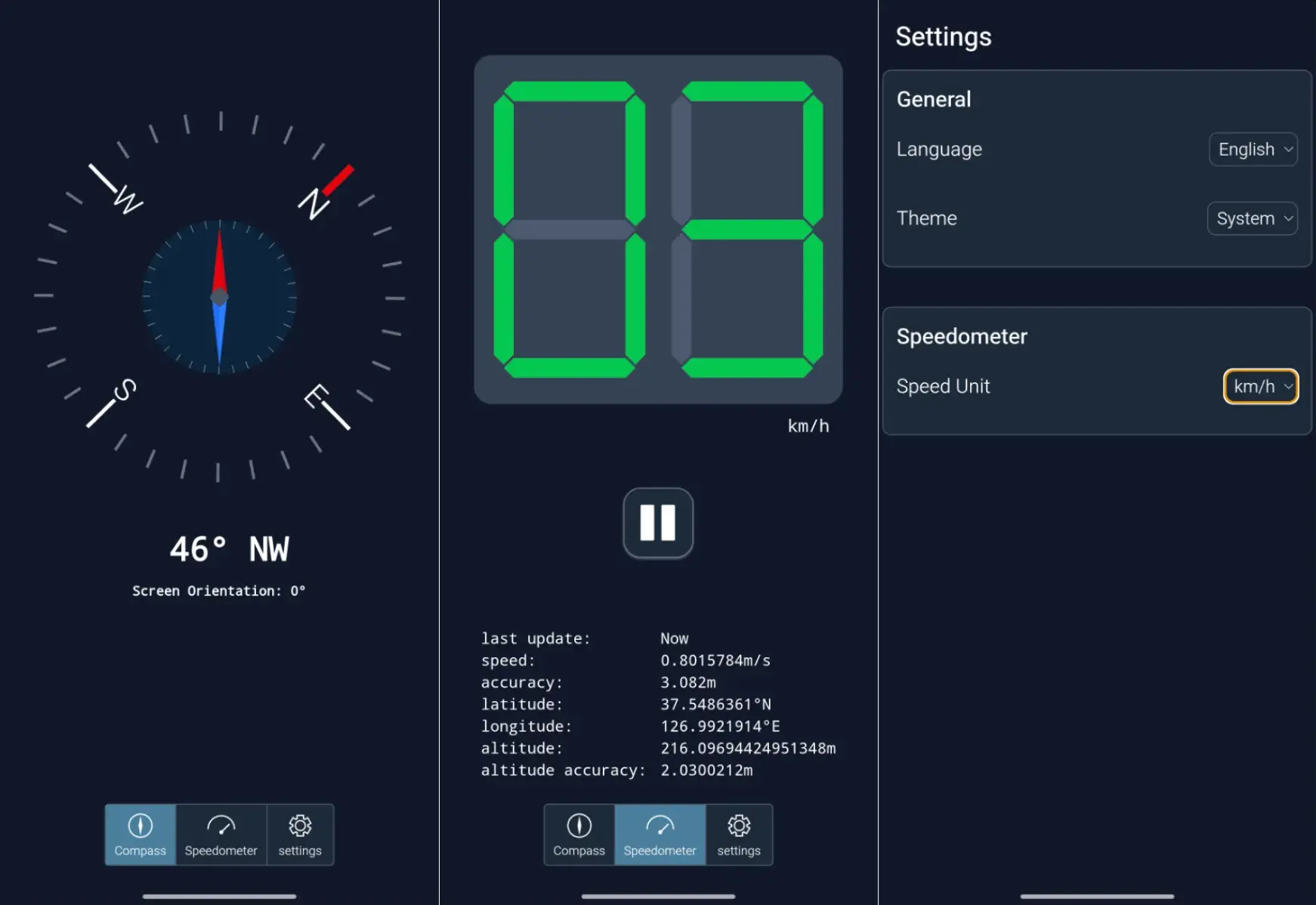
This app is nothing revolutionary; it simply provides a magnetic compass and a speedometer using your phone's sensors.
The motivation to build this ordinary sensor app is that
there are hardly any apps on Google Play Store that are not filled with excessive ads.
So tiSensible does not have any ad as of now. But things can change.
If you want to try it (thank you) you can download APK files from the GitHub release page, and the code is visible to all.
Sorry but I did not publish it on Google Play Store. Google keeps asking developers to comply with more and more requirements, and I think that is one of the reasons why developers add ads to their apps. It's too much work.
And in this post, I want to talk about CapacitorJS that powers tiSensible.
Why CapacitorJS?
First, what is CapacitorJS?
Capacitor is an open source native runtime for building Web Native apps. Create cross-platform iOS, Android, and Progressive Web Apps with JavaScript, HTML, and CSS.
https://capacitorjs.com/
Briefly speaking, it's a WebView app development framework. One similar framework is React Native. However, one clear difference between them is that CapacitorJS uses WebView while React Native doesn't.
Also you can build your app with CapacitorJS using your favorite web tools;
React, Vue, Svelte, or even vanilla Javascript!
Then CapacitorJS will read index.html from dist directory and load your build outputs.
Drop Capacitor into any existing web project, framework or library. Convert an existing React, Svelte, Vue (or your preferred Web Framework) project to native mobile.
https://capacitorjs.com/
Keep the Web Code Clean
So basically you can deploy your pre-existing web app by simply adding CapacitorJS. And your web app runs in a WebView on your device, almost like in a web browser.
More than that, they provide official plugins that bridge the gap between your web app and the native. Import a plugin, and use as if it was plain Javascript library.
// This snippet is from https://capacitorjs.com/
import { Camera, CameraResultType } from '@capacitor/camera';

// Take a picture or video, or load from the library
const picture = await Camera.getPicture({
  resultType: CameraResultType.Uri
});
These are some example plugins.
| Plugins | Description |
|---|---|
@capacitor/geolocation | Get and track the current location of the device. |
@capacitor/motion | track accelerometer and device orientation, such as compass heading. |
@capacitor/dialog | Provides methods for triggering native dialog windows for alerts, confirmations, and input prompts. |
So as long as you do not need some native features that CapacitorJS does not provide you can focus on your web code.
However, you might be worried that your app will not work on web if you import CapacitorJS in your project.
Your concern makes sense, but one strong point of CapacitorJS is that it supports web as well as Android and iOS!
That means you do not have to maintain a pair of your project each for web and native platforms.
Capacitor fully supports traditional web and Progressive Web Apps. In fact, using Capacitor makes it easy to ship a PWA version of your iOS and Android app store apps with minimal work.
https://capacitorjs.com/docs/web
If you need to run different code based on platform, you can easily do that as CapacitorJS tells you which platform it is running on.
import {Capacitor} from '@capacitor/core';
// 'web' | 'ios' | 'android'
const platform = Capacitor.getPlatform();
if (platform === 'ios') {
  // Do something.
}
See-through Native Code
One unique thing about CapacitorJS is that it generates the native code inside a subfolder inside your project. You run the command to deploy your app on Android.
npx cap add android
Then CapacitorJS will create a subfolder android and put the native code inside it.
Let's run tree android -L 2 to see what's in there.
android
├── app
│   ├── build
│   │   ├── generated
│   │   ├── intermediates
│   │   ├── outputs
│   │   └── tmp
│   ├── build.gradle
│   ├── capacitor.build.gradle
│   ├── proguard-rules.pro
│   ├── release
│   │   └── app-release.apk
│   └── src
│       ├── androidTest
│       ├── main
│       └── test
├── build.gradle
├── capacitor-cordova-android-plugins
│   ├── build
│   │   ├── generated
│   │   ├── intermediates
│   │   └── outputs
│   ├── build.gradle
│   ├── cordova.variables.gradle
│   └── src
│       └── main
├── capacitor.settings.gradle
├── gradle
│   └── wrapper
│       ├── gradle-wrapper.jar
│       └── gradle-wrapper.properties
├── gradle.properties
├── gradlew
├── gradlew.bat
├── local.properties
├── settings.gradle
└── variables.gradle
Yes, it's just an Android app project folder! Changes to those files will be applied on your app. This transparency makes you feel you truly own your app.
Note
I don't know how things work for iOS,
But according to CapacitorJS documentation, it seems similar.
https://capacitorjs.com/docs/ios#opening-the-ios-project
Thoughts on CapacitorJS
It is Fast
I did not notice any problem related to performance.
It's just fast. The app opens and closes quickly, and the UI reacts as soon as I touch the screen.
I would not have noticed that it's a web-based app if I did not develop it.
Back in 2021, I developed a React Native app. The app had some stutters, lags and instability. That app required relatively heavy tasks like communicating with other devices, with TCP sockets. But even if I take that into account, it was just slow. Compared to that, it feels like a magic.
Of course things have got much better; it has been 5 years.
Phones got snappier, web and frameworks got optimized.
But even if I take that into account, I think most of you will be satisfied with the performance
unless your app does some intensive tasks.
It's just a web app. And many apps are built on web already.
Live Reloading can be Tricky
Note that this is not just CapacitorJS's problem; every other WebView app framework has it.
Live reloading is one of the most crucial features when you write code and test it. Building and deploying apps every time you make a change is not an easy job. Live reloading does that automatically for you. And CapacitorJS provides the feature, as long as you do not add native-related plugins or change the native code.
Rather than deploy a new native binary every time you make a code change, it reloads the browser (or Web View) when changes in the app are detected.
https://capacitorjs.com/docs/guides/live-reload
However, in most cases you will run your dev server on your PC and your web app on your phone.
So http://localhost, which is a secure context, will not apply here because they are different machines.
Therefore, if you use some web APIs that require secure contexts (e.g. Web Crypto API, File System API),
they won't work because the web is served over plain HTTP protocol, insecure contexts.
So you need to serve your web app through HTTPS, which may require creating self-signed certificates
and installing and trusting them on your phone, or adding a HTTPS proxy. This is cumbersome.
However your native-related plugins will work fine as they run native code.
If you want to know more about live reloading with HTTPS, see this blog post from ionic team.
https://ionic.zendesk.com/hc/en-us/articles/11384425513623-Live-Reload-with-HTTPS
There are Still Some Gaps to be Filled
Though most of my app was built using web APIs, CapacitorJS APIs, and official plugins, there were still some gaps to fill; the gaps between web and native.
For instance, @capacitor/geolocation provides most of the information on web, iOS, and Android platforms.
However, on Android there is a bunch of information that is available such as the number of satellites
from GnssStatus.
They are not available from the official plugin; you need to find another plugin or your own solution to get those.
Also, on Android, there is no official CapacitorJS command to change your app's version.
You need to open android/app/build.gradle file and manually update it.
These are just some examples, I think you will come across more gaps to be filled as you go deeper, especially if you need core native features, something that is not widely used. So before you jump right into CapacitorJS I recommend listing what features your app provides, and checking whether CapacitorJS is capable of those.
Note
Also, even if CapacitorJS aims to provide common device functionality across multi platforms, there are still inherent differences among platforms.
Relatively Small Ecosystem
One thing to note is that CapacitorJS has a relatively small ecosystem and community compared to React Native.
The image below shows popularities of React Native and CapacitorJS as of July 2026.
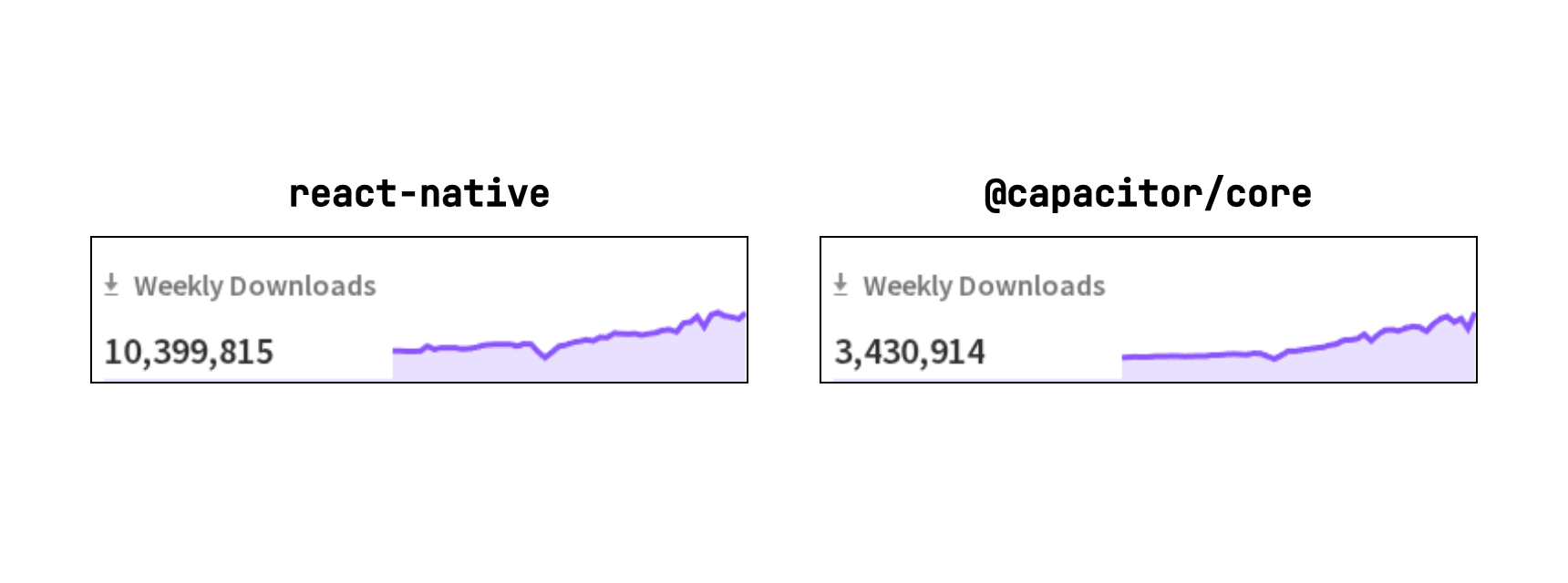
So you might find it hard to get information, but I think the ecosystem is mature enough. And CapacitorJS has an advantage that it exposes native project code and even lets you modify it. There is less of a black box compared to other frameworks that hide their native internals.
CapacitorJS Has its Use
Even with the weak points I mentioned above, I am happy to have CapacitorJS powering my app.
As a web FE developer, it's familiar, intuitive, and easy.
I don't have to deal with XML styling, component lifecycle, and unfamiliar Kotlin code.
Some may find that CapacitorJS isn't for them, while others think it is right for them.
And I think my App, tiSensible is the kind of app CapacitorJS is well suited for.